
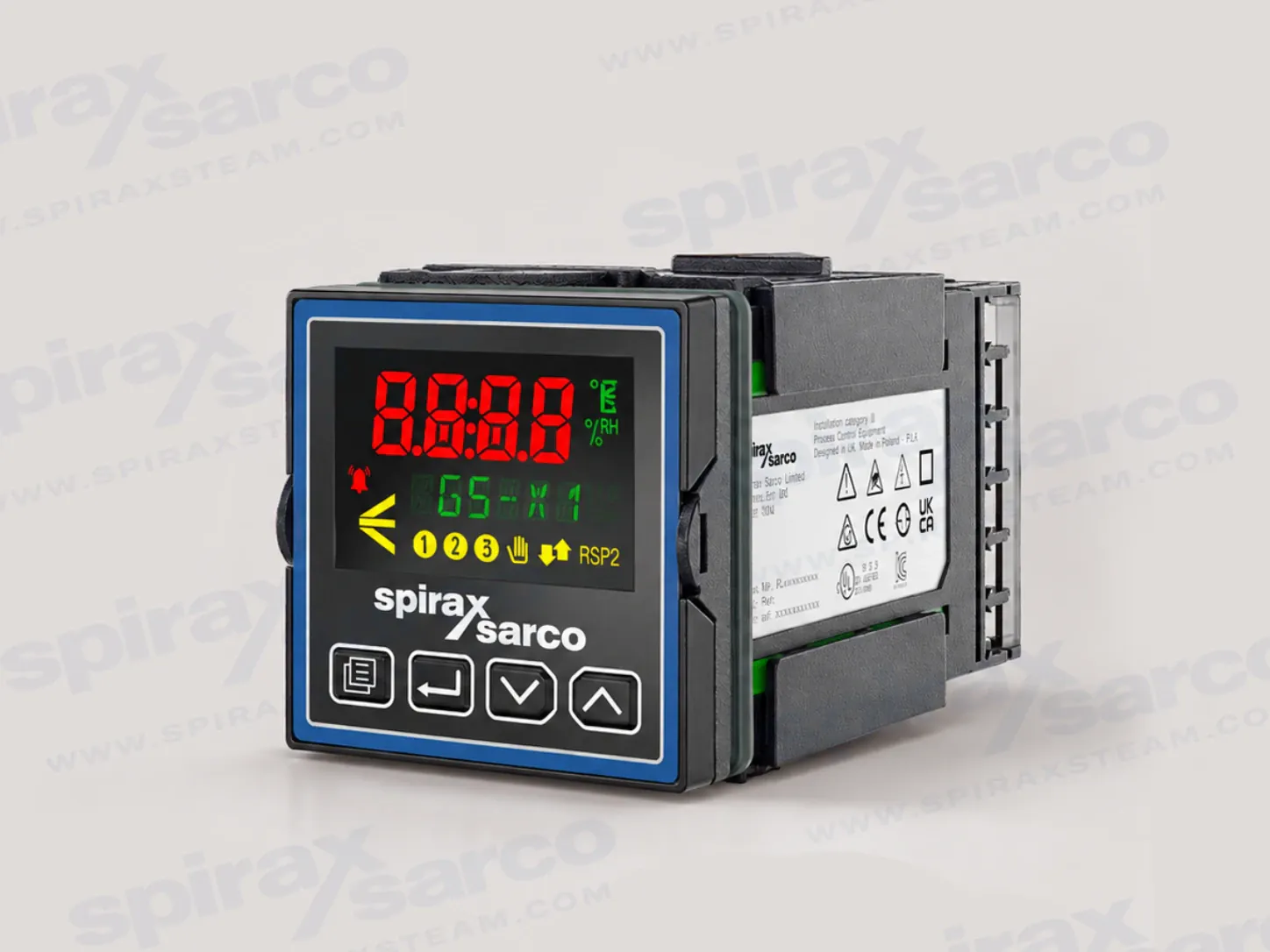
GS-X1 programmable PID controller
The Spirax Sarco GS-X1 is a compact, panel-mounted programmable PID controller for single-loop thermal and process control. It is intended for engineers who need accurate measurement, repeatable control and a practical way to connect a local loop with a wider plant control system. The controller combines a high-visibility operator display with configurable inputs, outputs, alarm functions and communication options, so the same 1/16 DIN panel position can be matched to different process signals and control strategies.
The controller is suited to temperature, pressure and other measured process variables where a single control loop is required. Its control engine supports PID operation, enhanced autotuning, on/off control and valve positioning without a slidewire. That combination is useful when a plant needs a stable control response but the final control element or feedback arrangement may vary between applications. It does not remove the need for a properly engineered process design: sensor location, actuator behaviour, output type, alarm response and the consequences of a failed signal must be reviewed as one system.
Control functions for real process conditions
For Spirax Sarco GS-X1 applications, the controller applies a configurable control strategy rather than a fixed temperature-only algorithm. The documented PID functions include cutback to help reduce overshoot, autotuning for commissioning, separate proportional behaviour for heating and cooling within a PID set, and gain scheduling for changing operating conditions. Feedforward functions can use the measured process variable, setpoint or monitored AC supply voltage where the ordered hardware and configured application support them. These features allow the commissioning engineer to match the response to the load instead of relying on one set of default values.
Setpoint programming is available as an ordered function. The technical information describes profile arrangements including up to 20 profiles of 8 steps, with ramp, dwell, holdback and event behaviour available according to the selected configuration. A profile can therefore represent a repeatable thermal sequence or another controlled process routine, while the standard loop continues to provide the underlying feedback control. Confirm the required profile capacity and event I/O when specifying the order code; the existence of the function does not mean that every GS-X1 configuration includes every programme option.
Function-block wiring extends the controller beyond a basic loop. Depending on the ordered toolkit and application, the documented blocks include mathematics, logic, multiplexing, timers, counters, totalisation, recipes, linearisation, zirconia functions and input monitoring. The practical benefit is that common interlocks, signal conditioning and selection logic can be held in the controller configuration instead of being spread across improvised external components. Configuration remains an engineering responsibility: every active path, alarm, fallback and manual mode must be tested before the controller is connected to a live process.
Universal input and flexible output selection
A GS-X1 has one universal process input. The documented signal families include thermocouples, Pt100 and Pt1000 resistance thermometers, 4-20 mA and 0-20 mA current signals, 10 V, 2 V, 0.8 V, 80 mV and 40 mV voltage ranges, zirconia oxygen probes and pyrometers. The data sheet specifies an input accuracy of +/-0.1% of reading, with different sample times for process, thermocouple and RTD measurements. Input filtering can be set from off to a 60 second time constant, and user calibration can apply a two-point offset/gradient adjustment when the installation procedure and quality system require it.
An optional auxiliary input accepts 0-10 V or 4-20 mA and can be used for a remote setpoint or another auxiliary analogue function. This is useful when the local controller must follow a supervisory setpoint while retaining local display and loop operation. Specify the required input function rather than assuming that an auxiliary terminal has a universal purpose. The actual sensor type, range, engineering unit, calibration method and sensor-break response should be recorded in the commissioning documentation.
The standard output arrangement includes one Form C changeover relay. Subject to the ordered hardware, I/O1 and I/O2 can be assigned as Form A relay, logic I/O, isolated DC analogue output or TRIAC output. These choices cover common heater, solid-state relay, proportional valve, retransmission and event-output interfaces, but the load and isolation requirements determine which module is appropriate. An optional current-transformer input can monitor a documented current signal for partial-load or load-fault functions. When the final control element is a modulating valve, review the available control valve range alongside the controller output, actuator and feedback requirements.
Communications and operator visibility
For plant integration, GS-X1 can be ordered with one serial or Ethernet communications option. The technical documentation lists EIA-232, EIA-485 and EIA-422 serial choices, together with Modbus RTU, Modbus TCP and Ethernet protocol configurations that can include EtherNet/IP or BACnet according to the selected hardware and software. Ethernet uses a shielded grounded RJ45 connection with 10/100BASE-T auto-sensing and can use a fixed IP address or DHCP. Confirm the precise protocol, role and network security requirements before ordering; the controller should be treated as an industrial control device, not as an unmanaged general-purpose network appliance.
The backlit LCD gives the operator a four-digit process-variable display with three decimal places, units and a scrolling text line. It can show the active setpoint, output and alarm status while the four front buttons provide navigation through operating and configuration levels. The display is intended to make a local loop understandable during normal operation and commissioning, while passcode protection and configuration levels help separate everyday adjustment from engineering changes.
Panel fit, environment and service boundary
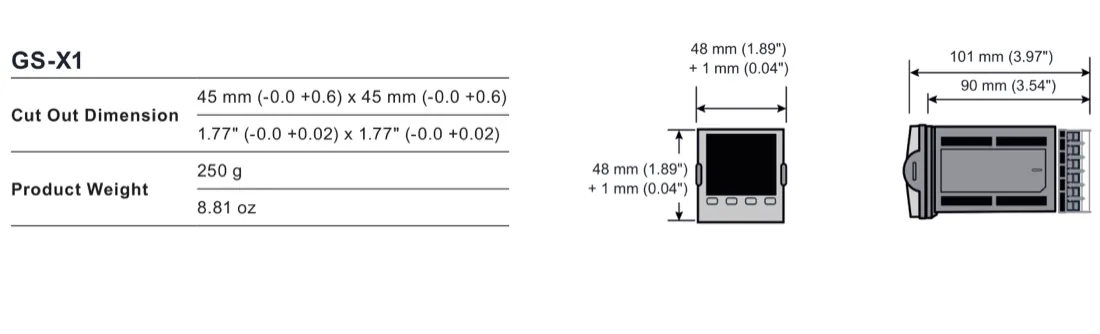
GS-X1 uses a 45 x 45 mm panel cut-out with a -0/+0.6 mm tolerance. Its front is approximately 48 x 48 mm, its depth behind the panel is approximately 90 mm and its weight is approximately 250 g. The instrument is intended for permanent indoor installation in an electrical panel or cabinet. The documented operating temperature is 0 to 55 deg C, storage is -20 to +70 deg C, and humidity is 5% to 90% RH non-condensing. A washdown bezel provides IP66 and NEMA 4X-equivalent front protection for indoor use; the rear is rated IP10. The enclosure and cabinet must still be suitable for the surrounding installation and must control conductive contamination, condensation and access to hazardous wiring.
These limits matter when choosing a panel location. Keep the controller away from excessive vibration, corrosive or explosive atmospheres and sources of conductive pollution. Separate low-voltage sensor and communication wiring from high-current power wiring, use the specified cables and provide appropriate strain relief. The primary sensor input is not isolated from some logic and digital-input circuits, so a directly connected live sensor can place associated terminals at line potential. This is a design and maintenance boundary, not a detail to be solved by the front bezel rating.
Selection and ordering checklist
- Define the process variable, sensor type, range, engineering units, calibration method and sensor-break response.
- Choose the control action, heating or cooling strategy, autotune approach, alarm functions and any ramp/soak or function-block options.
- Confirm the standard relay and any I/O1/I/O2 modules against the load, actuator, interlock and retransmission circuits.
- Choose the supply voltage, bezel style, communication option and network protocol from the current order code.
- Do not assume a transmitter power supply is available on GS-X1; the installation manual states that it is not available on this model, so confirm the current configuration with the supplier.
- Check the panel cut-out, rear clearance, environmental conditions, enclosure rating and isolation boundaries before installation.
When assessing a replacement or migration project for Spirax Sarco GS-X1, compare the existing controller's application, I/O allocation, configured logic and commissioning records with the SX80 process controller information only as an engineering reference. The final GS-X1 order must be based on the target process and current configuration code, not on model names alone. Installation, wiring, commissioning and maintenance must be carried out by qualified personnel with all power and I/O circuits isolated as required by the instructions.
Product function
GS-X1 is a panel-mounted programmable single-loop PID controller for thermal and other process control. Its documented functions include PID control with enhanced autotuning and cutback, on/off control, valve positioning without a slidewire, gain scheduling, feedforward, alarms, recipes and optional setpoint programming. The functions available on an installed instrument depend on the ordered hardware and software configuration.
The controller has one universal process input. An optional auxiliary analogue input can be configured for a remote setpoint or another auxiliary function. The standard output hardware includes one Form C changeover relay. Up to two optional I/O modules can be selected from Form A relay, logic I/O, isolated DC analogue output and TRIAC types, subject to the current order code.
Environmental specifications and protection
| Item | GS-X1 documented value |
|---|---|
| Operating temperature | 0 to 55 deg C (32 to 131 deg F) |
| Storage temperature | -20 to +70 deg C (-4 to 158 deg F) |
| Operating/storage humidity | 5% to 90% RH, non-condensing |
| Atmosphere | Non-corrosive and non-explosive |
| Installation environment | Indoor use only, in an electrical panel or cabinet |
| Front protection | Washdown bezel: EN 60529 IP66 and UL50E Type 4X, equivalent to NEMA 4X for indoor use |
| Rear protection | EN 60529 IP10 |
| Electrical safety | EN 61010-1, installation category II, pollution degree 2 |
| EMC | EN 61326-1 industrial immunity; supply emission class depends on the power-supply version |
Dimensions, cut-out and weight
| Dimension or mass | GS-X1 value |
|---|---|
| Panel cut-out | 45 x 45 mm, -0/+0.6 mm (1.77 x 1.77 inch, -0/+0.02 inch) |
| Front size | Approximately 48 x 48 mm; bezel geometry may add the documented latching/curved-bezel dimensions |
| Depth behind panel | Approximately 90 mm |
| Product weight | Approximately 250 g (8.81 oz) |
Universal process input
| Characteristic | GS-X1 specification |
|---|---|
| Input types | Thermocouples, Pt100/Pt1000 RTD, 4-20 mA, 0-20 mA, 10 V, 2 V, 0.8 V, 80 mV, 40 mV, zirconia oxygen probe and pyrometers |
| Input accuracy | +/-0.1% of reading |
| Process input sample time | 50 ms (20 Hz) |
| Thermocouple sample time | 62.5 ms (16 Hz) |
| RTD sample time | 100 ms (10 Hz) |
| Input filter | Off to 60 s filter time constant |
| Thermocouple types | K, J, N, R, S, B, L and T as standard, plus two downloadable custom curves |
| Nominal signal ranges | 40 mV, 80 mV, 0.8 V, 2 V, 10 V, RTD resistance ranges and current input up to the documented +/-32 mA range |
| Sensor break | AC sensor-break detection; worst-case detection within 3 s |
| User calibration | Two-point input offset/gradient adjustment and transmitter output scaling |
Auxiliary input and optional interfaces
| Interface | Documented GS-X1 arrangement |
|---|---|
| Auxiliary analogue input | Optional; 0-10 V or 4-20 mA; 4 Hz sample rate; 14 bit; less than +/-0.25% of reading plus 1 LSD |
| Standard output | One Form C changeover relay |
| Optional I/O modules | Up to two freely selectable modules: Form A relay, logic I/O, isolated DC analogue output or TRIAC output |
| Optional current transformer input | 0-50 mA RMS, 48-62 Hz; internal 10 ohm burden resistor; measurement scaling options include 10, 25, 50 and 100 A |
| Contact-closure input | One optional contact-closure logic input, subject to ordered hardware and configuration |
| Transmitter power supply | Not available on GS-X1 according to the model-specific installation guide; confirm the current order code before specifying field instruments |
Power and communications
| Item | GS-X1 specification |
|---|---|
| High-voltage AC supply | 100-230 Vac +/-15%, 48-62 Hz |
| Low-voltage AC supply | 24 Vac +10%/-15%, 48-62 Hz |
| Low-voltage DC supply | 24 Vdc +20%/-15%, maximum 5% ripple voltage |
| Power rating | Approximately 6 W |
| Overvoltage category | CAT II |
| Serial options | EIA-485 half duplex or EIA-422/EIA-232 full duplex, with documented baud rates of 4800, 9600 and 19200 |
| Ethernet option | Shielded grounded RJ45, 10/100BASE-T auto-sensing, fixed IP or DHCP |
| Protocols | Depending on the selected option: Modbus RTU, Modbus TCP, EtherNet/IP or BACnet |
Display and control functions
| Item | GS-X1 documented value |
|---|---|
| Display | High-visibility backlit LCD with a washdown membrane bezel or a sculpted bezel with tactile keys |
| Main process variable | Four digits with three decimal places |
| Text display | Scrolling alphanumeric line; Roman and simplified Cyrillic character sets |
| Displayed status | Process variable, units, setpoint, output status, alarm indication, programmer status and communications activity |
| Front buttons | Page, Scroll, Lower and Raise; F1 and F2 are not fitted on GS-X1 |
| Protection | Passcode level protection with a configurable lockout period |
Control, approvals and ordering notes
- Enhanced autotuning includes a cutback function intended to reduce overshoot and oscillation.
- Two PID sets are documented as standard, with an optional extension to eight PID sets.
- Setpoint programmer options include up to 20 profiles of 8 steps; confirm the selected application and option code.
- When the necessary field calibration is completed, the source states that supplied controllers can meet the accuracy requirements described for AMS2750F and CQI-9 applications. This is not a substitute for the applicable quality-system validation.
- Order the controller against the current hardware and software code. Confirm the sensor, output modules, communications, bezel, supply, labels and application before purchase.
- The controller contains no user-serviceable parts. The source lists a USB backup lead, iTools configuration software, snubbers, resistors and current transformers as accessories.
Installation and Maintenance Guide
- Safety information
- Controller introduction
- Panel installation and removal
- Terminal wiring and isolation
- Start-up and configuration
- Operator interface and commissioning
- Cybersecurity, maintenance and disposal
These instructions apply the verified GS-X1 installation, wiring and operating boundaries from IM-P794-03 to the single-model product page.
1. Safety information
Electrical equipment must be installed, operated and maintained by qualified personnel. Before installation, removal, wiring, maintenance or inspection, turn off all power to the controller and to connected I/O circuits such as alarms and control outputs.
Intended use and system responsibility
Use the controller only within the specified technical data, instructions and applicable regulations. Perform a risk assessment for the planned application and implement the required safety measures. The controller is a component of a larger machine or process; the designer and commissioning person remain responsible for the safety of the complete system.
Electrical and fire hazards
Install the unit in an enclosure or cabinet that provides fire containment and restricts access to hazards. Do not exceed the ratings. Wire and fuse power-line and output circuits according to local and national requirements. Use the correct supply version shown on the controller label and use isolating PELV or SELV supplies for low-voltage equipment.
Live sensor boundary
The primary sensor input is not isolated from the logic outputs and digital inputs. In a direct-heated arrangement these terminals can be at line potential. Protect service personnel and use cables, connectors and switches rated for the applicable live-sensor voltage and category.
Control and configuration hazards
Do not use the controller as the sole protection in a critical application where people or equipment rely on the control circuit. Do not configure it while connected to a live process: entering Configuration mode pauses outputs. Use suitable interlocks and test all normal and fault conditions before approval for service.
2. Panel installation
GS-X1 is intended for permanent indoor installation in an electrical panel. Choose a low-vibration location with an ambient operating temperature of 0 to 55 deg C and humidity of 5% to 90% RH non-condensing. The controller can be mounted in a panel up to 15 mm thick. A minimum 2 mm mild-steel panel and a non-textured mounting surface are recommended to maintain effective sealing and the stated front protection.
- Prepare a 45 x 45 mm cut-out with the documented -0/+0.6 mm tolerance. When multiple controllers are fitted, allow at least 10 mm spacing.
- Switch off all power and remove the panel retaining clips from the sleeve.
- Check that the gasket is behind the front bezel, is not twisted and is suitable for the panel surface.
- Insert the sleeve and controller through the cut-out, then push both retaining clips forward until the instrument is secure and the panel seal is maintained.
- Remove the display protective film after installation. If the sleeve must be removed, first isolate all power. If the Ethernet option is fitted, remove the Ethernet cable before withdrawing the controller from the sleeve.
Polarising features help prevent an inverted installation, an incompatible power-supply unit being inserted into a sleeve and an instrument being inserted into a sleeve with a non-compatible terminal assignment. Do not rely on the polarising features in place of checking the order code and terminal label.
3. GS-X1 terminal layout and options
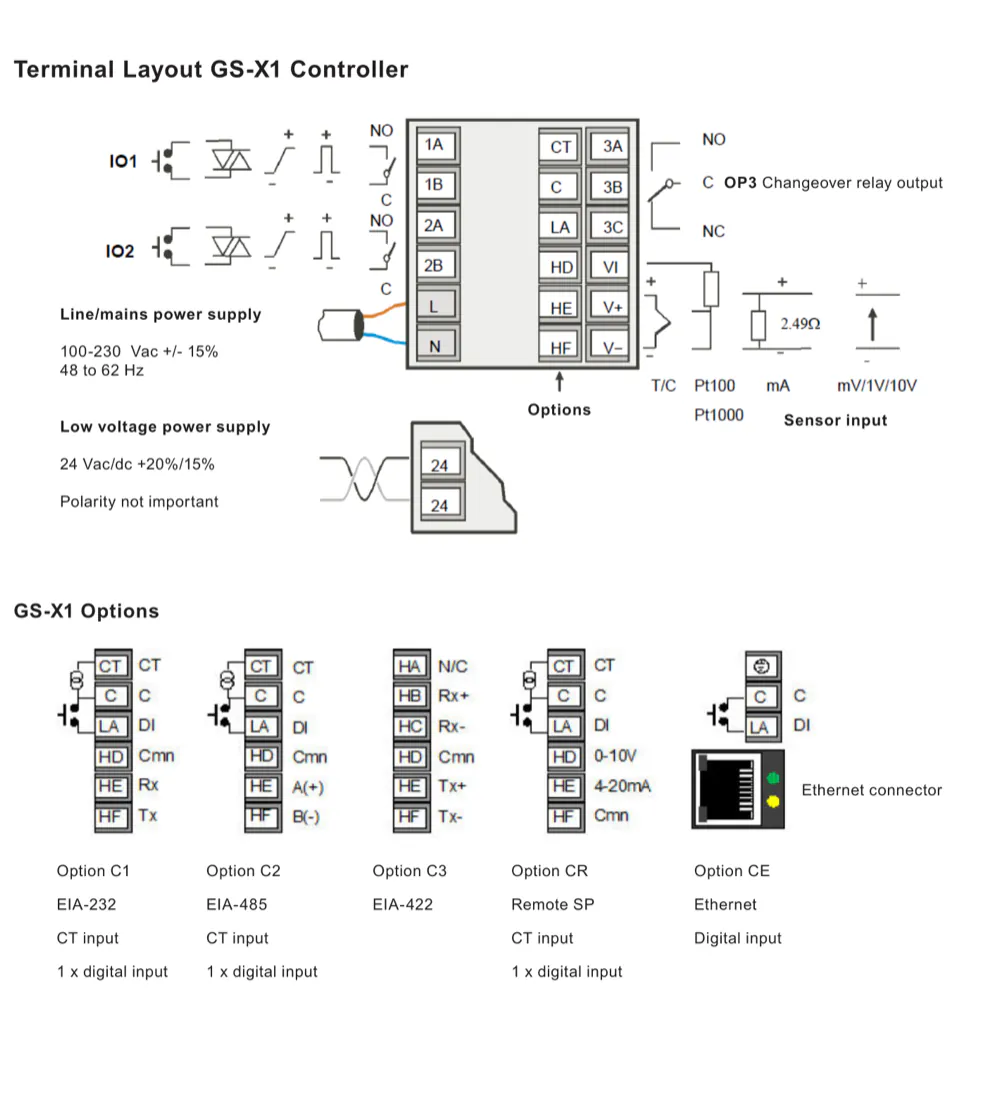
The GS-X1 terminal arrangement provides the sensor input, OP3 Form C changeover relay, supply terminals and option positions. The documented option positions include EIA-232, EIA-485, EIA-422, remote setpoint, Ethernet, current-transformer input and a digital input, subject to the ordered option. Do not connect a module or signal to a terminal solely because the location appears available; verify the supplied hardware and wiring label.
4. Wiring and isolation
Secure cables and wiring harnesses with appropriate strain relief and prevent conductive material from entering the case. Use only the identified terminals and the originally supplied connectors. Keep sensor and low-voltage DC wiring away from high-current power wiring. Where separation is impractical, use suitable shielded cable with the shield grounded as specified by the installation design.
| Wiring item | Installation requirement |
|---|---|
| Terminal wire size | 0.5-1.5 mm2; maximum two wires per terminal, identical in type and cross-sectional size |
| Stripping | Strip at least 6 mm of insulation and do not leave more than 2 mm of exposed conductor |
| Terminal screws | Tighten to the specified torque of 0.5 Nm and verify the conductor is secure |
| Power supply | Match the supply to the rating on the controller label; do not connect a low-voltage version directly to line voltage |
| Current transformer | If fitted, provide voltage limiting across the CT terminals to reduce hazardous voltage when the controller is unplugged |
| Inductive load | Use the specified snubber/protection arrangement where required; confirm that leakage current will not hold a high-impedance load on |
Isolation diagrams in the source identify 300 Vac double or basic isolation boundaries. The primary sensor, CT and digital-input relationships require a specific safety review because some circuits are not isolated from one another. Do not infer isolation from a terminal position or from the use of a low-voltage sensor alone.
5. Start-up and configuration
At power-up the controller performs a display diagnostic and checks the fitted hardware. A hardware mismatch or keyboard-check failure can place the instrument in standby. A new unconfigured controller enters Quick Start mode, where two sets of five characters are used to select the application, sensor type, range and available digital functions. A controller supplied with a hardware and software code can start directly in its configured operator display.
- Confirm the supply, sensor, output wiring, enclosure, interlocks and isolation before energising the controller.
- For a new unconfigured unit, enter the Quick Start selections for the actual application. Do not select a function whose required hardware is not fitted.
- For a configured unit, check the application, input range, control action, setpoint limits, alarm thresholds and output behaviour.
- Use Configuration level or the iTools configuration package for functions not exposed by the quick codes. Save a verified configuration backup before making major changes.
- Test sensor-break, alarm, manual, standby, communication-loss and output-fault behaviour under controlled commissioning conditions.
Changing configuration or flash-memory settings can place the controller in Configuration mode and stop process control. Configuration changes must therefore be made with the process in a safe state and must be approved before returning the system to service.
6. Operator interface and commissioning
GS-X1 uses four navigation buttons: Page, Scroll, Lower and Raise. Page selects displays or list headers, Scroll selects parameters, and Lower/Raise adjust values within the permitted limits. Holding Page for more than three seconds selects the Goto function. Page plus Scroll returns to the Home display. The front panel does not include the two function buttons used on larger controller formats.
Commissioning should confirm the process-variable indication, engineering units, active setpoint, output indication, alarm indication, manual/automatic behaviour, programmed sequences and communications status. Check the response after a process disturbance and verify that the selected control output cannot drive an actuator beyond the safe operating boundary. Where the controller drives a valve, confirm that the output action and actuator fail position agree with the process risk assessment.
7. Network and cybersecurity
When a communications option is used, protect the controller as part of the industrial control network. The installation guidance recommends that controllers and associated devices are placed on a firewalled network segment separated from the public Internet, rather than being directly exposed. Disable unused communication features, change default access credentials where applicable, restrict configuration access and document the permitted master devices and network paths.
Validate the complete system after a power cycle, communications interruption or configuration recovery. A network message can continue to influence an output if the output is configured for communications control, so the loss-of-communications response and local fallback must be tested explicitly.
8. Maintenance, cleaning and disposal
The controller contains no user-serviceable parts. Isolate all power and I/O before inspection or removal, observe electrostatic-discharge precautions and do not disassemble, repair or modify the equipment. Contact the supplier for repair or replacement. Use only the specified accessories and genuine replacement items.
A mild soap solution may be used on exterior surfaces; isopropyl alcohol may be used for labels as described by the source instructions. Prevent liquid or conductive material from entering the case. If stored before use, keep the instrument within the specified storage temperature and humidity conditions. Dispose of the equipment in accordance with the applicable WEEE and local electronic-equipment requirements.